Check the Rendered Heading Tree at Every Breakpoint
A desktop heading check does not establish the heading structure at another breakpoint. Inspect the article in its own browsing context and record the actual viewport width alongside the ordered heading tags. A page can retain its copy and appearance while a responsive title uses a different HTML element.
This is a first-party engineering note from PokerMagicShop. AI assisted with the explanation, diagnostic code and original diagram. The case comes from saved checks of our own page before publication; the new probe and explicitly synthetic checks below are separate work.
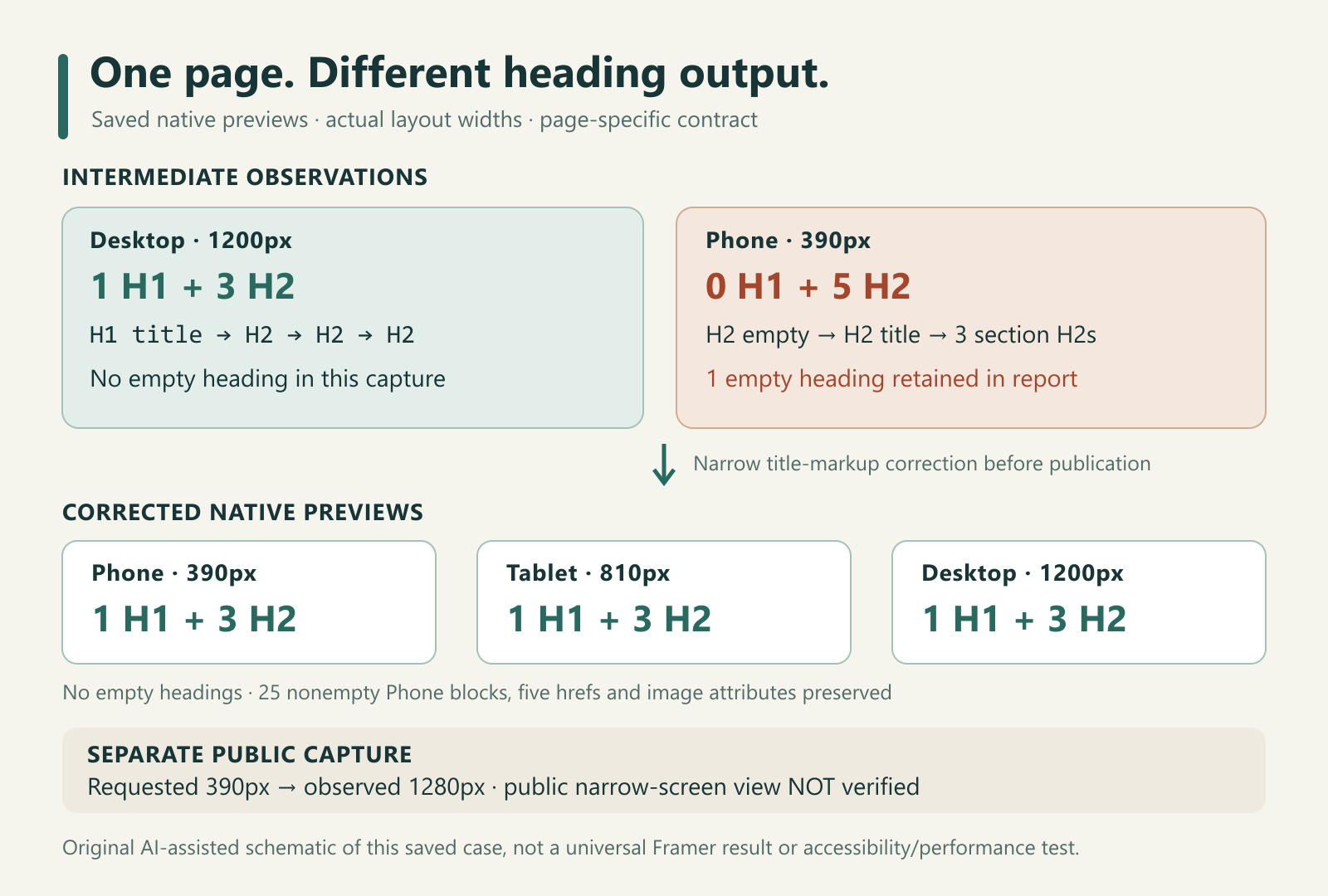
Original AI-assisted schematic of saved observations. It is not a screenshot, performance measurement or general claim about Framer.
Define the contract before counting
For this article, the intended structure was one title marked h1, followed by three section headings marked h2. That was our page-specific acceptance contract. It is not a universal HTML validity rule: MDN's heading reference notes that multiple non-nested h1 elements are allowed, although a single descriptive h1 is generally preferable.
Font size does not establish heading level. Here, “heading tree” means the ordered native h1–h6 tags and labels inspected within one article. It does not mean a computed document-outline algorithm or the browser's accessibility tree.
Preserve the intermediate failure
During an intermediate native preview, Desktop at an actual layout width of 1200px had the expected h1, h2, h2, h2 sequence. Phone at 390px instead produced this saved sequence:
[
  ["H2", ""],
  ["H2", "Battery Capacity vs Running Time: Compare the Quantities First"],
  ["H2", "Same charge, two different loads"],
  ["H2", "Compare the actual catalog statements"],
  ["H2", "Why real running time needs conditions"]
]
The empty heading matters. Removing empty labels from a report would conceal one of the actual findings. These are the intermediate observations, not an earlier initial preview or a production incident.
We corrected the title markup locally in the unpublished page. The saved captures establish different outputs and a resolved finding; they do not establish a Framer-wide defect or its internal cause.
| Observation | Actual innerWidth |
H1 | H2 | Empty headings |
|---|---|---|---|---|
| Intermediate Desktop | 1200 | 1 | 3 | 0 |
| Intermediate Phone | 390 | 0 | 5 | 1 |
| Corrected Phone | 390 | 1 | 3 | 0 |
| Corrected Tablet | 810 | 1 | 3 | 0 |
| Corrected Desktop | 1200 | 1 | 3 | 0 |
Audit the article, not the editor shell
Run this read-only function in the browsing context containing the article. In an embedded preview, that means the preview frame rather than its surrounding editor. MDN defines innerWidth as the layout viewport width, including a vertical scrollbar when present; the root document's clientWidth is also recorded.
function auditArticleHeadings(selector) {
  if (typeof selector !== "string" || !selector.trim()) {
    throw new TypeError("Provide an explicit article selector.");
  }
  const roots = document.querySelectorAll(selector);
  if (roots.length !== 1 || roots[0].localName !== "article") {
    throw new Error("Selector must match exactly one article element.");
  }
  const root = roots[0];
  const view = root.ownerDocument.defaultView;
  if (!view) throw new Error("Article has no browsing context.");
  return {
    rootSelector: selector,
    innerWidth: view.innerWidth,
    clientWidth: root.ownerDocument.documentElement.clientWidth,
    headings: [...root.querySelectorAll("h1,h2,h3,h4,h5,h6")].map(
      (node, index) => {
        const text = node.textContent.replace(/\s+/g, " ").trim();
        return {
          index,
          tag: node.tagName,
          text,
          empty: text.length === 0,
          hasCssBox: node.getClientRects().length > 0,
        };
      },
    ),
  };
}
Call auditArticleHeadings("#your-article") with the actual article selector. A missing, ambiguous or non-article root throws instead of silently scanning navigation and unrelated headings. The function makes no changes or network requests. It was written after the case and did not generate the historical captures above.
All native heading nodes remain in DOM order, including hidden responsive copies. hasCssBox is a separate clue: MDN's getClientRects() reference explains the empty result for elements without rendered boxes. Box presence alone does not establish visibility, an accessible name or accessibility-tree inclusion. This light-DOM probe does not traverse shadow roots or include ARIA headings.
Check the reporting behavior separately
A deliberately synthetic fixture uses CSS-only variants:
<style>
  .phone-copy { display: none; }
  @media (max-width: 600px) {
    .desktop-copy { display: none; }
    .phone-copy { display: block; }
  }
</style>
<article id="fixture">
  <h1 class="desktop-copy">Fixture title</h1>
  <h2 class="phone-copy"></h2>
  <h2 class="phone-copy">Fixture title</h2>
  <h2>Section A</h2><h2>Section B</h2><h2>Section C</h2>
</article>
This is not a reconstruction of the original implementation. The all-node sequence remains one H1 and five H2s at either width; only box-presence flags change. Inspect both columns rather than automatically treating hidden copies as the active hierarchy.
Our full local fixture also includes an outside heading and a second article to exercise scope failures. It ran in the in-app browser at a measured 1280px: ten checks passed, covering scope, DOM order, the empty label, box flags, viewport readback, invalid selectors and unchanged article HTML. A separate read-only invocation returned the same report. That run exercised the wide fixture branch; it was not a new mobile test.
Six plain-data contract assertions ran under Node v24.22.1 with zero failures. They covered a matching sequence, mismatched width, an empty heading, wrong order despite equal counts, and invalid inputs. Those assertions did not execute a DOM or measure a viewport.
Keep preservation and public checks distinct
The corrected native captures preserved 25 nonempty Phone content blocks, all five existing hrefs, and the image's source, alt and dimensions. This is narrower than bitwise project equality or equality with the original PNG: platform image delivery can transform bytes.
The released example page provides the public result, not the historical failure. Its saved public observation had one H1 and three H2s. However, a public capture requested at 390px actually reported 1280px. We therefore left the public narrow-screen check unverified. Native Phone390 was a different observation and could not fill that gap.
Record the width actually observed, retain the failed sequence, and rerun the relevant context after correction. These checks support a bounded markup acceptance decision. They do not certify screen-reader behavior, WCAG compliance, search ranking or Core Web Vitals.
About the author
- https://pokermagic.shop/en
Comments
Join the discussionNo comments yet. Be the first to comment.